
What should a company consider before migrating to the cloud?

Before moving systems to the cloud, a company should review application fit, identity security, compliance duties, support ownership, internet dependency, recovery planning, and total operating cost so the migration improves resilience instead of shifting existing problems elsewhere.
Ariel M. approved a fast migration of a file server and order workflow to a cloud platform without mapping print-software dependencies or testing identity sync. By Monday morning, label printing failed across two locations, order processing stalled, and the cleanup, emergency consulting, and lost production reached $74,500.
The following scenario is based on a redacted real-world business IT incident pattern. Identifying details have been changed for privacy, but the disruption sequence and cost impact remain realistic.

About the Author: Scott Morris
Scott Morris is an experienced IT and cybersecurity professional with 16 years of hands-on experience in managed technology services. He specializes in What should a company consider before migrating to the cloud? and has spent his career building practical recovery, security, and operational continuity processes for businesses across Nevada.
Scott Morris is a managed IT and cybersecurity professional who helps businesses manage infrastructure, reduce cyber risk, maintain stable systems, and recover cleanly when incidents or outages occur. Scott Morris has 16+ years of managed IT and cybersecurity experience. That background matters in cloud migration because failures usually come from weak identity controls, undocumented application dependencies, unclear ownership after cutover, or poor recovery planning rather than from the cloud platform alone. His work is grounded in practical risk reduction, business continuity, secure infrastructure management, recovery readiness, and operational resilience for business technology environments, including Reno and Sparks organizations that need reliable and compliance-aware systems.
This article explains the main operational and security issues a company should review before moving to the cloud. This is general technical information; specific network environments and compliance obligations change strategy. Regulated data, legacy software, and vendor contracts often require case-by-case review.
A cloud migration is not just moving files or email into someone else’s infrastructure. It changes where authentication happens, how staff access applications, how data is protected, what breaks when internet service degrades, which vendor owns which layer of support, and how quickly operations can be restored when something fails.
- Application fit: Review whether line-of-business software, scanners, print workflows, browser requirements, and licensing models will still function when servers or data move offsite.
- Connectivity dependence: Determine what happens when internet service is unstable, because a healthy cloud platform does not help if the office cannot reliably reach it.
- Security ownership: Clarify who manages identity, device policy, logging, backups, and incident response after cutover.
- Cost structure: Compare recurring subscription, storage, security, and support costs against the systems being replaced, including user growth and retention requirements.
Companies that already run disciplined managed IT services tend to migrate more cleanly because asset inventories, patch standards, and escalation paths already exist. Environments that depend heavily on email, file sharing, and collaboration should also review Microsoft 365 security for business use before migration, because identity misconfiguration often becomes the first cloud-era failure point.
What should actually move to the cloud, and what should stay where it is?

Start with business workflows, not with a blanket goal to move everything. Some systems are well suited to cloud delivery, such as collaboration platforms, email, document management, and applications designed for browser access. A common failure point is assuming an older line-of-business application is cloud-ready because a vendor says it can be hosted remotely, when in practice it still relies on local database latency, mapped drives, USB-connected devices, or workstation-specific printer behavior. In mature environments, the decision is made workload by workload: what data it handles, who needs it, how downtime affects revenue, what integrations it depends on, and whether the application can be supported securely after migration. What usually separates a stable environment from a fragile one is a documented dependency review before any cutover date is approved.
Why do identity and access decisions matter before migration?
Once systems move to the cloud, user identity becomes a primary security boundary. Guidance from NIST SP 800-63B matters here because authentication is not just about passwords; it is about consistent identity verification, multifactor enforcement, and account lifecycle control from onboarding through termination. In practice, this often breaks down when former staff accounts remain active, service accounts are poorly documented, shared logins persist, or too many people receive broad administrative rights for convenience. The business consequence is direct: one compromised credential can expose email, files, remote access, and cloud administration at the same time. Before migration, a company should know who has access, which accounts are privileged, whether MFA is enforced across all accounts that matter, and how access reviews are recorded.
Which business risks can cloud migration reduce, and which new risks can it create?
A well-planned migration can reduce exposure to aging hardware, underpowered server rooms, inconsistent patching, and single-site equipment failure. It can also improve remote access and simplify support for distributed teams. The new risks show up when companies treat the cloud as automatic protection: internet dependence becomes more serious, recurring licensing can outpace expectations, data sharing can be misconfigured, and the shared-responsibility model can leave security gaps if nobody owns logging, retention, or device policy. In weak environments, leadership hears that a workload is “in the cloud” and assumes it is fully monitored, recoverable, and compliant. In practice, the issue is rarely the platform alone; it is the process around it, including who reviews alerts, who approves changes, and who is responsible when an integration fails after hours.
How does a competent cloud migration work in practice?
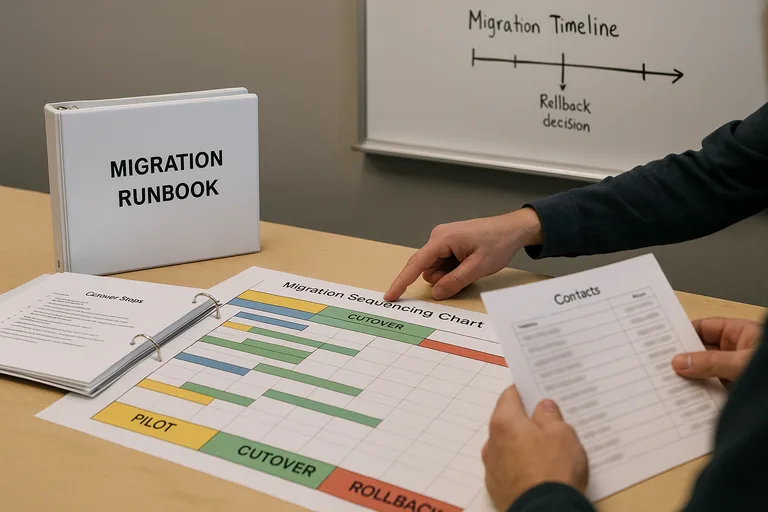
A competent migration starts with discovery: asset inventory, user and group review, dependency mapping, data classification, internet capacity review, and a clear list of business processes that cannot fail during cutover. The team should define what moves first, what stays temporarily hybrid, what the rollback point is, and how success will be validated the same day. During one pre-migration review, repeated authentication prompts on a pilot group led the team to trace a legacy copier using basic SMTP with an old account; that signal exposed a wider problem in which device accounts and application credentials had never been documented. Catching that before go-live prevented failed invoicing and account lockouts. This is where disciplined proactive IT management matters, and why guidance from the Cybersecurity and Infrastructure Security Agency (CISA) is relevant: a migration plan needs protected data copies, a tested rollback path, and recoverable configuration records rather than an assumption that the destination platform will cover every recovery need automatically.
What evidence shows a provider or internal team is prepared to migrate safely?
- Current asset inventory: A documented list of servers, applications, users, devices, and integrations that will be affected.
- Dependency mapping: A written record showing which systems rely on local databases, printers, scanners, domain services, shared drives, or third-party connectors.
- Identity review records: Role assignments, privileged account lists, MFA enforcement status, and documented access review results.
- Pilot and test results: Evidence that a limited user group has validated sign-in, file access, printing, mobile access, and line-of-business workflows before full cutover.
- Recovery documentation: Rollback steps, backup scope, restore test results, and a defined decision point for reversing a failed migration.
- Change and communication records: A scheduled cutover plan, business-owner approvals, escalation contacts, and post-migration validation checklists.
When does weak cloud implementation become dangerous?
It becomes dangerous when the migration looks complete on paper but ownership and control are still unclear. A common failure point is a cloud tenant built quickly under pressure, with inconsistent MFA, too many global administrators, no retained logs long enough for investigation, and old on-premises systems still syncing identities without anyone reviewing health alerts. Another weak pattern is moving data first and governance later, which leaves sensitive files overshared, retention settings inconsistent, and terminated-user access removed informally instead of through auditable process. During incident response, it is common to discover that security tools were enabled but nobody was assigned to review the alerts, or that a provider can describe the architecture but cannot produce access review logs, change records, or post-cutover validation results. That is hidden fragility: the environment may appear modern, yet recovery and accountability are still weak.
What should a company do before making a final go-or-no-go decision?
Before approving migration, leadership should require a business impact review, a clear scope, named owners for security and support, a budget for recurring cloud costs, and a written statement of what success looks like after cutover. A competent provider should be able to explain downtime windows, rollback criteria, user communication, licensing impact, and how ongoing monitoring will work once the migration is complete. If the answers are vague, if the inventory is incomplete, or if nobody can show test evidence, delay the move. Companies that want fewer surprises should also connect the migration plan to broader infrastructure management and support operations, because cloud stability still depends on disciplined device management, identity governance, and response ownership after go-live.